Fewer calls to your GP consultant.
Ledger Doctor checks Dynamics GP every night. What GP broke, it fixes, with a preview and an undo button. What you have to do in GP yourself, it walks you through step by step and checks your work. Whatever's left, it explains in plain English, so the call is a short one.
Early access: the first 10 customers get 50% off for two years.Before you call Ridgeview Supply Co., this morning
- Fixed Sales next number already in use Moved past the numbers in use, after a preview. Undo is one click.
- Guided Payment applied to the wrong invoice Unapply and reapply in GP: 5 steps with the real documents, then Check my work.
- Explained AP aging 1,240.18 higher than the GL All of it is unposted batch GLJE-1017. Post it and it ties.
- Runs on your own server
- Nothing changes without an approver
- Every guide checked in GP 18.5
- Built by a working GP consultant
Who it's for
Close teams
A month-end checklist that checks itself from GP, reconciliations and flux with sign-off, and a binder at the end.
Controllers and auditors
Journal entry review, payables fraud signals, a GP access review and the auditor's request list.
Moving off GP
See how ready your data is, clean it first, and connect your implementation partner with data you approve.
Implementation partners
Your customer's GP data, encrypted, in a workspace for your team, mapped to Sage Intacct with balances that tie.
The calls it answers
These are the reasons GP customers call a consultant, most common first, and what Ledger Doctor does about each. Fix means Ledger Doctor repairs what GP left behind. Guide means you do it in GP with Ledger Doctor's tested steps. Explain means it tells you exactly what's wrong and what to ask for.
| Why people call | What Ledger Doctor does | Answer |
|---|---|---|
| Year-end close | Puts every year-end close in GP's order, checks GP before you start, guides each close, and proves the new year's beginning balances tie | Guide |
| A posting got interrupted, or a batch is stuck | Releases batches held by people who left, clears leftover locks, walks you through Batch Recovery, and finds batches that claim transactions they don't have and documents whose batch is gone | Fix Guide |
| A subledger doesn't tie to the GL | Breaks the difference into reconciling items, document by document, to the cent, with a guide for each kind | Explain Guide |
| Users locked out, stuck logged in, or missing a company | Logs out users whose session is gone, and guides company access and SQL logins | Fix Guide |
| Payments applied wrong, or a document voided but still open | Finds payments applied for more than they're worth and customer checks entered twice, and guides unapplying, reapplying and voiding, with the real customer, vendor and documents filled in | Guide |
| Posted to the wrong period, or old periods left open | Guides a correcting entry, reopening a period and closing it again, with the posting date checked against GP first | Guide |
| Duplicate or orphaned records | Removes what GP left behind once its copy is complete elsewhere, finds applications GP kept twice, and guides Check Links where GP has a tool | Fix Guide |
| Trial balance doesn't match detail | Finds the accounts and periods, including summary rows GP would never write, and guides Reconcile | Guide |
| A transaction won't post to its account | Finds every default in posting setup, customers, vendors and items that points to a deleted or inactive account, before posting stops | Explain |
| Bank reconciliation won't balance | Proves each checkbook's last reconciliation, and guides clearing or voiding old items | Explain Guide |
| Backups, SQL jobs, disk space | Tells you exactly what to ask IT for. It never changes server settings | Explain |
Still your GP partner's work: installing GP updates and workstations, payroll tax updates, report writing, printing and forms. When you do call, Ledger Doctor has the details ready.
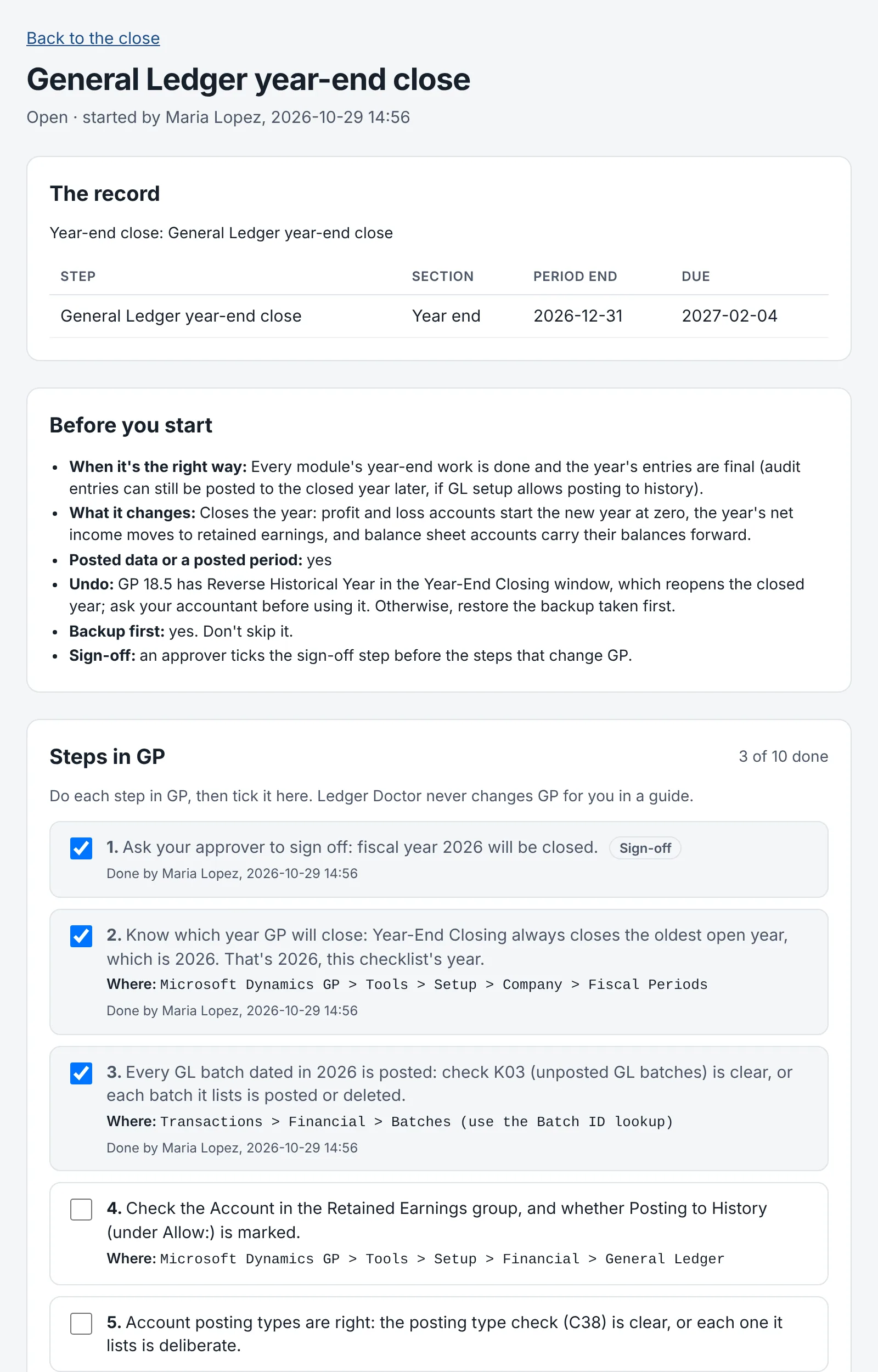
Year-end, guided
Start the year-end checklist and Ledger Doctor checks GP before you begin: next year's fiscal periods, the retained earnings account, account posting types, and anything still unposted.
Then each close has its own guide, in GP's order: payroll and W-2s, Inventory, Receivables, 1099s and Payables, Fixed Assets, and the General Ledger last. Every guide names the GP window, what to mark and what you should see, starts with a backup, and needs an approver's sign-off before the GL close.
Afterward, Check my work proves it: GP shows the year closed, every balance sheet account starts the new year where it ended, only the year's net income moved into retained earnings, and every profit and loss account starts at zero.
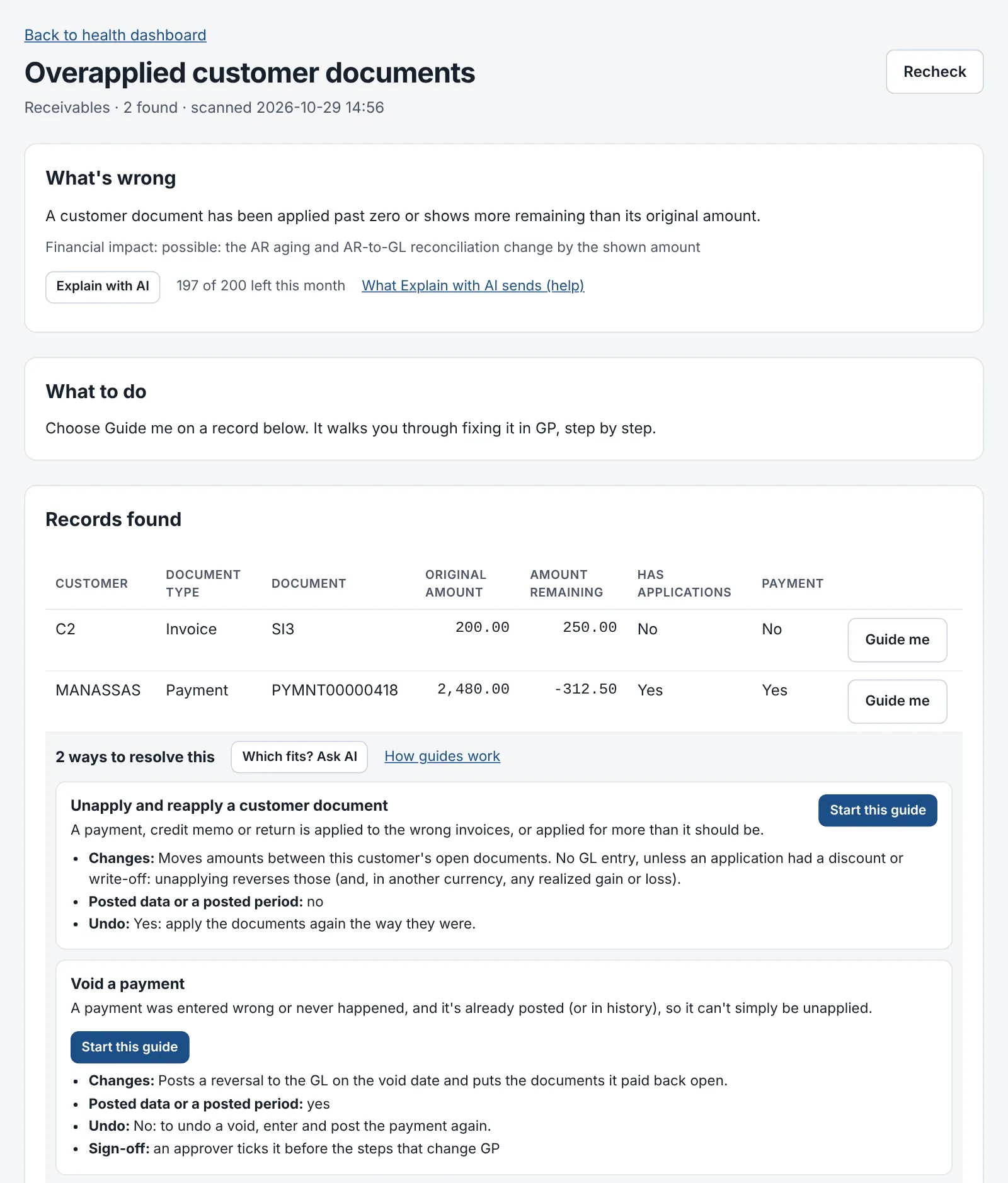
Guides for what you fix in GP
Some problems need a person to decide: unapply a payment, void a check, post a correcting entry. Open one and choose Guide me. Each way to resolve it says what it changes in the books, whether it touches a posted period, whether it can be undone, and whether it needs a backup or a sign-off.
- The steps use the real customer, vendor, document, batch and amount, and name the exact GP window.
- Posting dates are checked against GP's fiscal periods first, so GP doesn't refuse them halfway through.
- When more than one way fits, AI can pick the best one for that record and say why. It only picks: every step is Ledger Doctor's own, checked in GP.
- Check my work runs the check again. When the record's gone, the guide is resolved, and who did what is in the close binder.
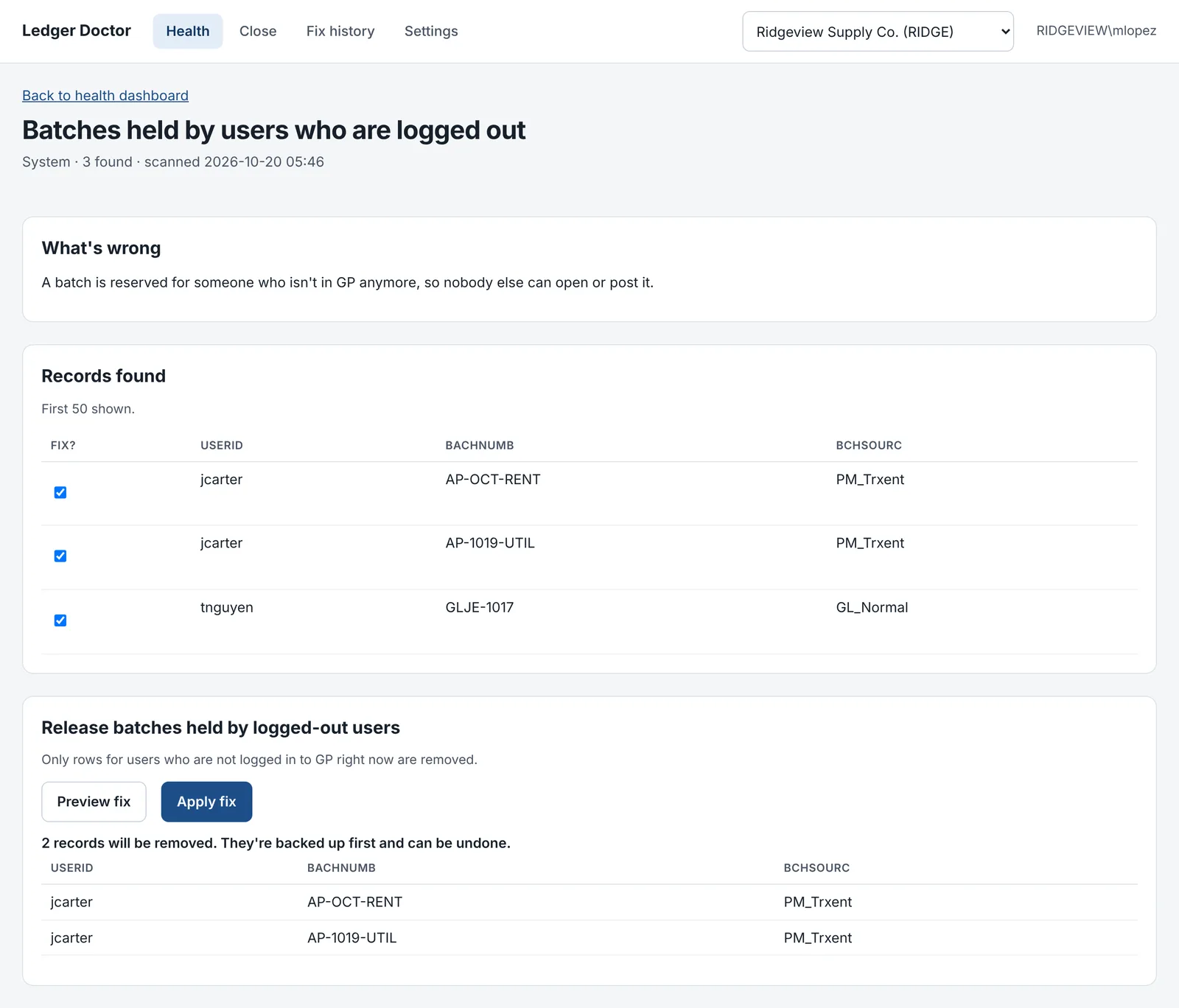
Fixes for what GP broke
When GP itself leaves something behind (after a crash, an interrupted posting or a lost connection), there's a one-click fix. Nothing changes until someone you've named as an approver previews it and clicks Apply.
- The preview lists exactly which rows will change. Rows that don't meet the fix's rule are left alone, and nothing runs while anyone is logged in to that company: the preview names who is.
- Every row is backed up first, and every fix has an Undo button and a line in the fix history. Apply and Undo both ask before they change anything, and a fix Ledger Doctor couldn't undo isn't applied at all.
- Thirteen fixes today: batches held by people who left, leftover locks, stuck logins, empty journal entry shells, sales next numbers in use, orphan sales and purchase order lines, unposted copies of posted documents, paid documents in both open and history, and sub-penny balances.
- The few that touch posted data are refused in closed periods and need your SQL Server administrator's permission once.
116 checks across GP, every night
Each check looks for a problem GP consultants see over and over, then says what it means and what to do about it. The check library updates itself from our server, so new checks arrive without a reinstall.
- Server and backupsDatabases offline, backups too old, disks filling up, SQL Agent stopped or failing
- SystemBatches held by users who left, leftover record locks, users stuck as logged in, batches that claim transactions they don't have, documents whose batch is gone
- General LedgerHidden unposted entries, posted entries out of balance, summary vs detail, accounts set up wrong for year-end close, defaults pointing to deleted or inactive accounts
- PayablesAging vs the AP control accounts, paid documents still open, overapplied documents
- ReceivablesAging vs the AR control accounts, sub-penny balances, applications to missing documents, payments applied for more than their amount, checks entered twice
- Sales Order ProcessingLines with no document, totals that don't match (posted and unposted), next-number collisions
- Purchase Order ProcessingPO status vs its lines, receipts that don't add up
- Fixed AssetsAsset cost and depreciation vs the GL, assets with no book
- InventoryTransactions missing their header, history with no site
- Close readinessUnposted batches in every module, Inventory included, depreciation not run through month-end, old periods left open
The other half: your close
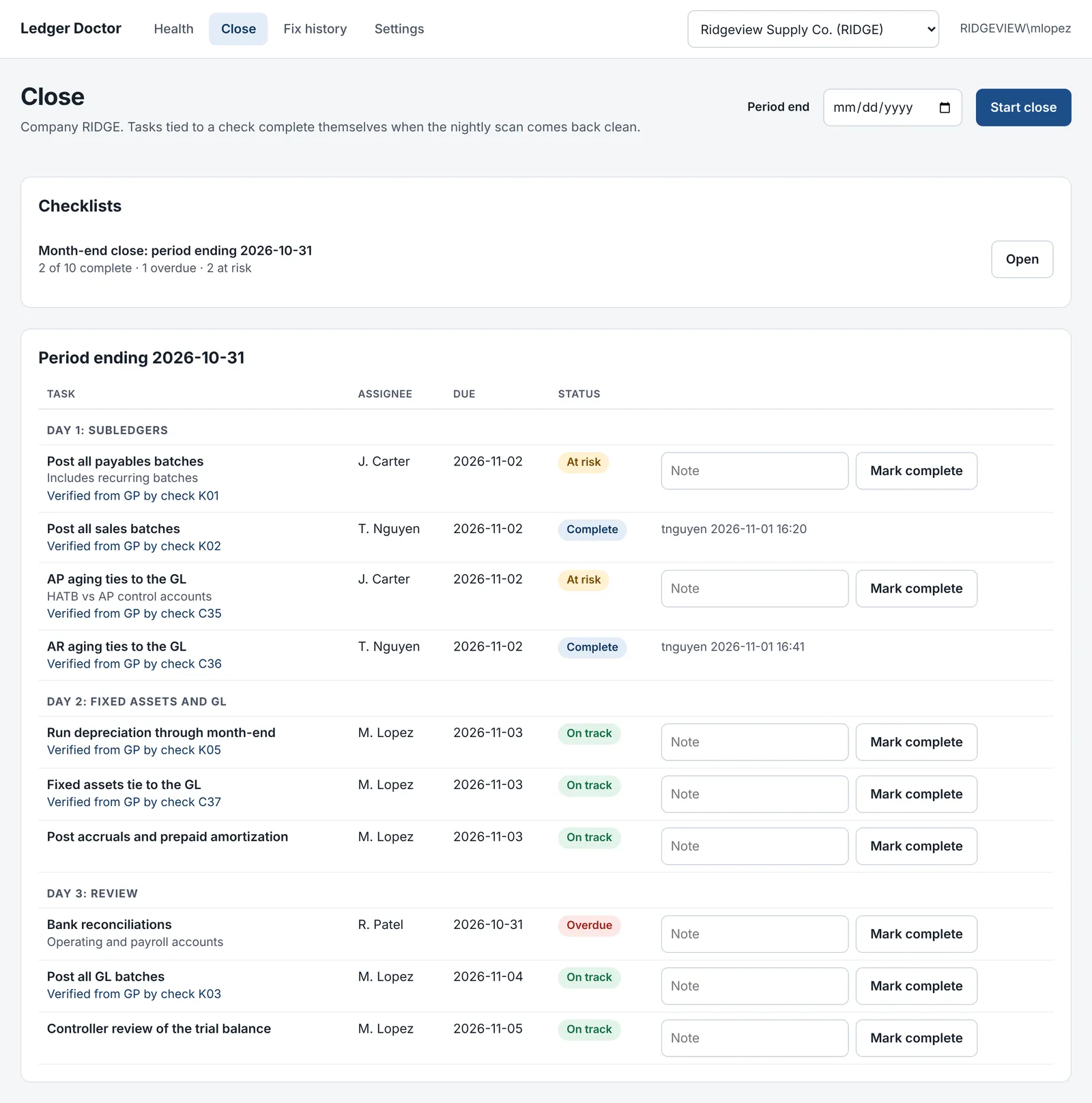
Fewer consultant calls is what Essentials is for. Close adds the month-end work most close tools charge five figures for, from the same numbers in GP.
Tie-outs for audit
Excel tie-outs for Payables, Receivables, Fixed Assets, the bank and the trial balance, as of any period end, with live formulas and every reconciling item listed. Each one checks its own work to the fraction of a cent before you get it. How tie-outs work
A checklist that checks itself
Month, quarter and year-end steps that complete themselves when GP comes back clean, your own steps alongside, and a close binder at the end with who did what. The close checklist
Reconciliations and flux, signed off
Every balance sheet account reconciled and reviewed, and every account that moved past your threshold explained, with a first draft written from the GL detail. Reconciliations
Explain with AI
A short explanation of a variance, a tie-out's reconciling items, a finding or a whole close. Every amount is checked against your data, and names are masked before anything leaves your server. Exactly what's sent
Microsoft is winding down GP. Your close isn't.
Enhancements, tax updates and technical support for Dynamics GP end December 31, 2029, and security updates end April 30, 2031. Most companies will run GP for years yet, with fewer people around who know it well.
Ledger Doctor is the GP expert that checks in every night. It catches the problems that used to wait for a consultant, keeps every close on schedule while you plan your next system, and leaves you with data that ties when it's time to move.
- NowNightly checks keep GP healthy
- December 31, 2029GP updates and Microsoft support end
- April 30, 2031GP security updates end
- When you're readyMove data that already ties
Dates from Microsoft's lifecycle policy for Dynamics GP.
Ready to move on from GP?
When it's time to replace GP, Ledger Doctor has your data ready: open documents that are really open, subledgers that tie to the GL, and period-end tie-outs that prove your opening balances for the migration and for the first audit on the new system.
It runs on your server, not ours
Your GP data stays put
A Windows service on your network reads GP straight from your SQL Server. Your financial data stays in your building, unless an approver turns on AI, which sends only the masked details of the one thing you ask about.
Installs in about 10 minutes
Unzip and double-click. Setup finds every GP company, creates Ledger Doctor's own SQL login, installs the service and runs the first scan. Updates install with one click. The install guide
Least access it needs
Read-only on GP, with write access only to the tables its fixes clean up. Nothing is installed in the GP client, so GP updates and add-ins don't break it.
Questions
Will it change my GP data without asking?
No. Scans are read-only. A fix runs only when an approver previews it and clicks Apply, the rows are backed up first, and you can undo it from the fix history. In a guide, you make the changes in GP yourself; Ledger Doctor only checks your work.
Does it replace my GP partner?
For the everyday calls, often yes: stuck batches, locked users, applying mistakes, a subledger that won't tie, the year-end closes. For installing GP updates, payroll tax updates, report writing and integrations, keep your partner. Ledger Doctor makes those calls shorter by having the details ready.
Which versions of GP and SQL Server does it work with?
Tested on SQL Server 2017, 2019, 2022 and 2025, including binary sort order and older database compatibility levels, and on GP 18.5. GP 2016 and 2018 are expected to work because the checks use GP's long-stable core tables; any check that finds a different table layout says it can't run instead of guessing. See the requirements.
What's in Essentials, and what's in Close?
Essentials ($2,400 a year) has the nightly checks, fixes, guides, the guided year-end, tie-outs for AP, AR, Fixed Assets and the trial balance, and the close checklist and binder, with 25 AI guide picks a month. Close ($4,800 a year) adds the bank tie-out, reconciliations, flux review, Teams and Slack, and 200 AI explanations a month. See pricing.
Will it keep working after Microsoft stops supporting GP?
Yes. It doesn't depend on Microsoft's GP updates: it reads GP's tables from SQL Server, and new checks come from our server. Microsoft's support for GP ends December 31, 2029, and security updates end April 30, 2031.
What kind of support is included?
Email support at support@myledgerdoctor.com for installing and using Ledger Doctor, and Report a bug inside the app. If a guide doesn't match what you see in GP, it tells you to stop and report it rather than guess.
Is it finished?
It's in early access. The checks and guides are tested against SQL Server and GP's sample company, and we're confirming them against live GP companies with our first customers. Founding customers get a lower price for helping us do that.
Fix it tonight. Call less tomorrow.
Essentials is $2,400 a year and Close is $4,800 a year, each covering every GP company on one SQL Server. Founding customers get 50% off for two years. Try it free for 45 days first, no card needed.